Physical Address
304 North Cardinal St.
Dorchester Center, MA 02124
Physical Address
304 North Cardinal St.
Dorchester Center, MA 02124

Somewhere on my phone there is a folder of apps I downloaded “for a trip.” I could not tell you what half of them do. One I opened exactly once, in an airport, while pretending to be an organised person. The trouble with travel apps is not a shortage. It is that nobody tells you which few are worth the space, and which ones fail the moment the signal does.
So here is the shortlist, with the reasoning attached.
If you install only a handful before your next trip, make them Google Maps (with your destination downloaded for offline use), Organic Maps as a backup, TripIt for your bookings, an eSIM, WhatsApp and Google Translate. The other fourteen depend on where you’re going and how you travel.
The full list at a glance:
Getting lost is part of travel. Getting lost with no data is just inconvenient. These five make it rarer.
You probably have it already, which is the point. Download the map of your destination on Wi-Fi and it keeps working on the plane and in patchy areas. Save places into a list per city so your research lives on one map. Check the busy-times graph before committing to a queue.
Offline mode is thinner than the online version: live traffic and some transit details won’t load. And opening hours can be wrong, so confirm anything you’re crossing town for.
Organic Maps is the offline backup. Contributors forked [copied and continued independently] the older Maps.me project in 2020 to build a version with no ads, no tracking and no account. It uses OpenStreetMap [a free, community-edited map of the world] data, and once you’ve downloaded a country it gives you search and walking directions in airplane mode. It’s particularly handy for footpaths and rural trails that other apps skip.
The best public-transport app in the cities it covers: real-time departures, which station exit to use, even where to stand on the platform. The limit is coverage. It supports roughly a hundred cities, mostly in the UK and Europe, with some in North America and Asia, so check the list before relying on it. Elsewhere, fall back on Google Maps.
Type in two places and it shows every way to connect them by plane, train, bus, ferry or car. Use it early in planning to find out whether a place is reachable without a car, or whether the ferry runs twice a week. Prices are rough. Confirm real schedules with the operator.
Ride apps spare you three small hassles: explaining the address, carrying cash and negotiating a fare. But Uber isn’t the default everywhere. Bolt is common across much of Europe and Africa, Grab across Southeast Asia, and many countries run on local apps. Before you fly, search “ride apps in [destination]”, install the right one and create your account at home, because some apps verify by text to a local number. Hard to do from an arrivals hall at midnight.
Its strength is flexible searching. Search a whole month at once, set the destination to “Everywhere” to see where your home airport can take you cheaply, and add a price alert so you stop refreshing the page. It sends you to the airline or a booking agent to pay, so compare final prices, bag fees and change rules before you commit.
Google Flights is excellent for comparing dates and nearby airports, but it runs in a browser rather than as a downloadable app, so it isn’t on this list.
Not sure when to book? Here is when to buy your ticket.
Kayak compares prices across hundreds of travel sites, tracks fare changes and nudges you on whether to book now or wait. Its “explore” tool suits people flexible on destination. Oddly useful: it can measure your bag with your phone’s camera to tell you whether it will pass as carry-on.
Hopper’s selling point is price prediction, built on a route’s fare history, telling you whether a fare is likely to rise or fall. Treat it as a second opinion, not a promise. It has grown into hotels, cars and paid extras like price freezes, which you can ignore.
One of the most-downloaded travel apps, and its map view is the feature that matters. Set a budget and see what’s genuinely walkable to the places you want, rather than the property that looked central until you zoomed out. Many rooms offer free cancellation, so you can book early and decide later.
Read recent reviews, not only the headline score, because noise, construction and “not like the photos” complaints surface there first. And check whether taxes and resort fees are included.
Best when you want a kitchen, laundry or room for a group, or when a neighbourhood has few hotels. The number to compare is the total, not the nightly rate, since cleaning charges, service fees and local taxes can change the value. Check house rules, the cancellation policy and how many recent reviews the host has.
Weighing Airbnb against the alternatives? See other vacation rental sites.
Worth keeping for bundles. Booking a flight and hotel together can lower the combined price, and the app surfaces those package deals more clearly than booking separately. Compare against Booking.com before you commit.
Hostels aren’t only for twenty-somethings with enormous backpacks any more, and Hostelworld makes comparing them easy: dorm or private room, location, atmosphere and recent guest reviews. Its chat feature helps solo travellers find out whether a place is sociable or silent. Check whether lockers need your own padlock, and watch for bed prices that rise after taxes, linen fees or deposits. Going alone? Our solo travel tips cover the rest.
Forward each confirmation email and TripIt assembles flights, hotels and car hire into one day-by-day itinerary. The free version organises; Pro, at around $49 a year at the time of writing, adds real-time delay alerts. If you take a couple of trips a year, free is enough. Skim the imported details, because automatic parsing isn’t flawless.
For people who plan on a map. Drop places into an itinerary and you can immediately see when a day zigzags across town. Several people can edit the same trip, so it suits group and road trips. Leave some white space in the plan.
Driving instead of flying? See apps built for road trips.
Useful for inspiration and a sanity check on what to do and where to eat, backed by over a billion traveler reviews. Most features need an internet connection, though you can download maps and city guides for offline use. Read recent reviews, and be wary of anything with only a handful.
Unglamorous and quietly the most useful on the list. Sign in to your booking and you get mobile check-in, boarding passes, gate changes and rebooking options. During a disruption the app can update before airport screens do. Keep an eye on the departure board anyway. Long-haul ahead? Plan for comfort on long flights and consider compression socks.
An eSIM app lets you buy a data plan before you leave, install it at home and have data the moment you land, with no roaming charges and no hunt for a local SIM. Airalo is one well-known option; Ubigi and Saily are others, and the best value varies by country.
Check three things before buying: that your phone supports eSIMs, whether the plan is data-only (most are, with no phone number included) and how long the data lasts. Plans can start at around US$5.
For more ways to cut your travel costs, see our full guide.
Americans tend to underrate it because it never took over at home. Across much of Europe, Africa and the Middle East, it is how hotels, drivers, guides and hosts expect to reach you. Set it up before you leave and verify your number while your usual SIM can still receive texts. In East Asia, local apps matter too: WeChat in China, LINE in Japan and Thailand, KakaoTalk in South Korea.
Download the offline language pack before you go. The camera mode translates menus and signs in place, and conversation mode handles back-and-forth speech. It covers more than 200 languages after a 2024 expansion. Be cautious with slang and anything high-stakes, such as medical or legal instructions.
Keeps recent exchange rates available offline, so you can check what a taxi or market purchase costs in your own money. The rate shown is a reference rate, not what your bank or card will charge after fees.
You don’t need all twenty. A rough guide:
Some of the biggest problems come from how we use apps, not which ones we choose.
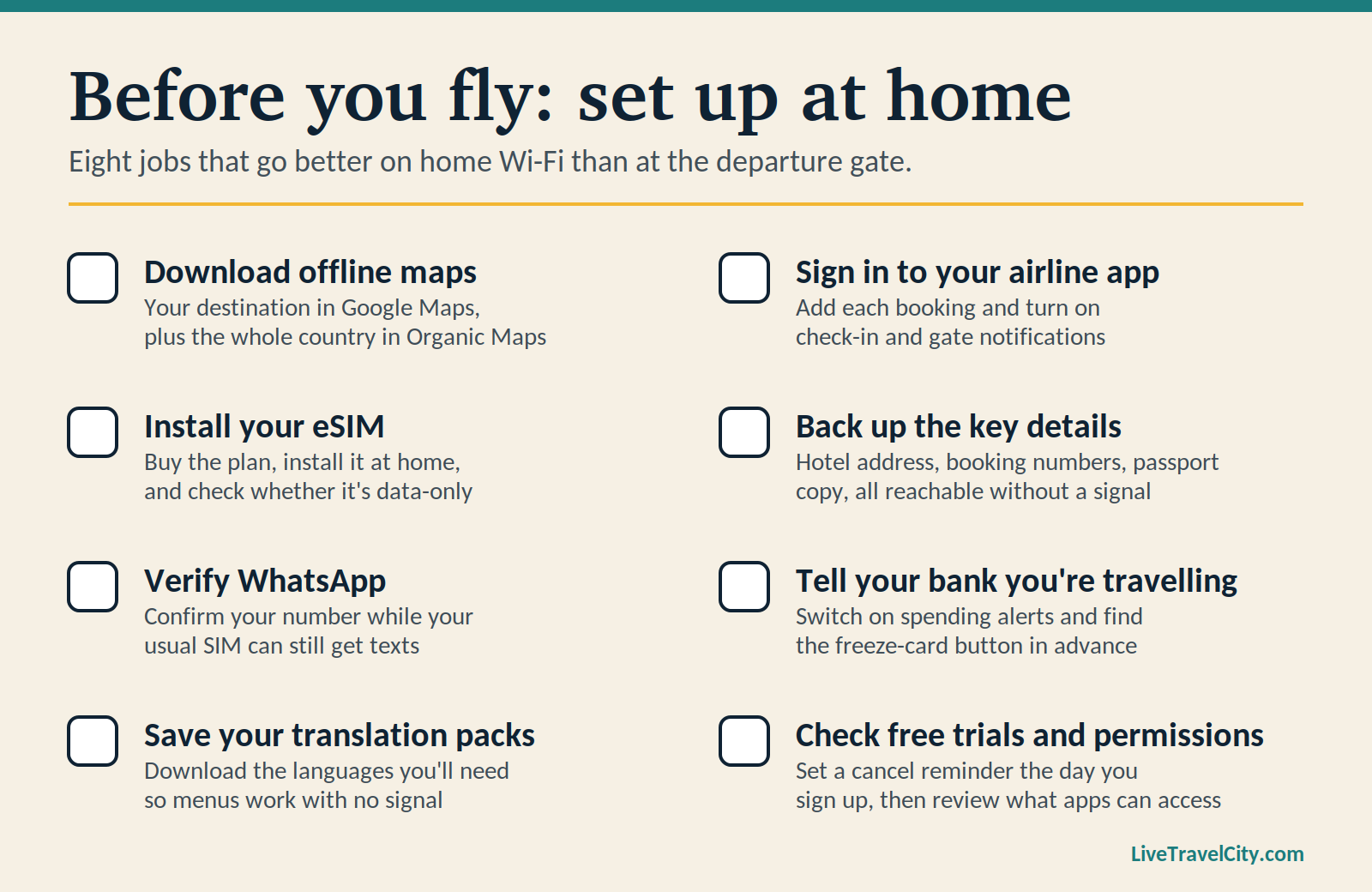
Downloading at the gate. Apps that need verification, maps and eSIM profiles all work better set up on home Wi-Fi.
Single points of failure. If your hotel address lives only in one app, screenshot it or save it elsewhere.
Forgotten free trials. Several travel apps have paid tiers with trial periods. Set a reminder to cancel the day you sign up.
Too many permissions. A currency converter doesn’t need your contacts. Review what each app asks for.
Trusting one source for rules. Visa, border and airline rules change. Use apps to organise, and confirm with official sources.
Because the category moves fast, apps get sold, redesigned, or shut down even legacy brands constantly pivot. Lonely Planet retired its classic Guides app before re-emerging with an entirely new app years later. And old lists linger. A search for this very topic still turns up a “top travel apps” roundup from 2010. If a list doesn’t say when it was last updated, treat it with suspicion. This one is dated for that reason.
Not all twenty. Pick the six at the top, add one or two for your specific trip and stop there. While you have Wi-Fi, download offline maps, install your eSIM and save your booking details somewhere that doesn’t need a signal.
Then close the phone once in a while. The apps are there to get you to the good part.